




How Regulators & Dimmers Help You Save Energy
September 30, 2026Modular Switch Accessories Explained: USB Sockets, TV Points, Internet & More
A switchboard spec that stops at switches and sockets is incomplete. Commercial and residential projects like offices, hotels, healthcare facilities, and multi-unit residential towers need charging points, TV connections, and data infrastructure built into the same modular plate as lighting and power.
For contractors, MEP consultants, and procurement teams, understanding what these accessory modules do and planning for them early prevents costly rework once interiors and IT fit-out begin.
Modular switch accessories solve that by slotting into the same frame as your switches and sockets, extending a switchboard’s function without separate wiring boxes or visual clutter.
What Are Modular Switch Accessories, and Why Plan for Them Early?
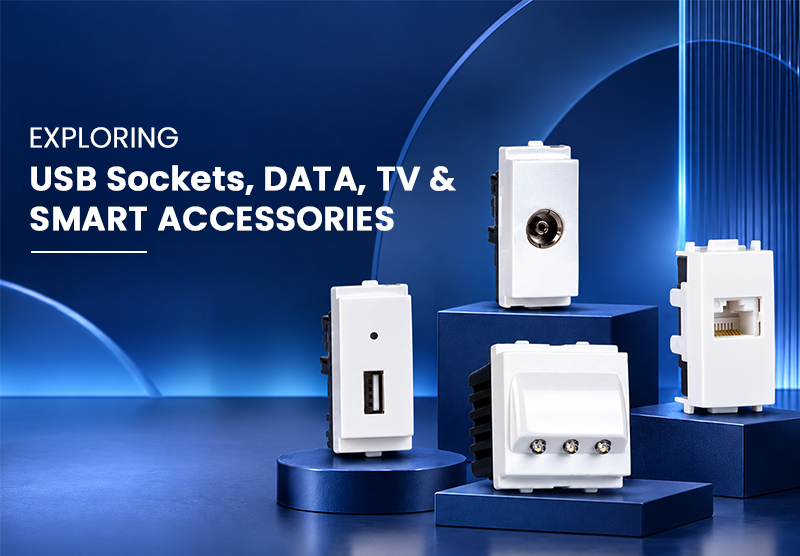
Modular switch accessories are individual electrical accessory parts, such as USB charging points, TV sockets, internet jacks, telephone jacks, blank plates, and indicators. They fit the same modular switch socket frame as standard sockets and switches. Because they use the same size, they can sit together on one modular switchboard. A switch, a socket, and a USB point can sit side by side on a single plate.
When planning, the takeaway is simple. Decide these points at the electrical layout stage, along with modular switches and socket placement. Avoid adding them after interiors are finished. If you miss a TV point or internet jack, you will either run wires on the wall later or open the wall again. Both are avoidable if the electrical contractor and the interior or technology team coordinate early.
USB Charging Sockets: What They Are and Where They're Used
A modular switch socket with a USB charging point lets you charge phones, tablets, power banks, and other USB devices directly from the modular switchboard. No extra adapters are needed. In hotel rooms, co-working desks, waiting areas, and conference rooms, these USB points cut down on loose chargers and messy cables. They are a simple electrical accessory that adds convenience without clutter.
For planning, check the USB module’s power rating against what you plan to charge. Then decide placement based on your furniture layout. A USB point behind a desk or bedside table only helps if you can actually reach it. Coordinate with your modular switches and sockets and switches layout early so you don’t have to move things later.
TV Co-Axial Points: Planning for Cable and Satellite Infrastructure
A TV socket, also called a coaxial point, is an electrical accessory that connects a television to the building’s cable or satellite feed. It fits the same modular switch socket system as other accessories. Unlike a power socket, it needs its own coaxial cable back to a distribution point. So its location must be fixed early. Moving a TV point after wiring is complete is much harder than moving a power socket.
On a modular switchboard, a TV point can sit alongside sockets and switches and other modular switches. This is why placement should be planned with furniture and room layout drawings, especially in hotels and homes. It should not be left to the electrical contractor alone.
Internet (RJ45) and Telephone (RJ11) Points: The Data Layer of a Switchboard
Two accessory types cover communication infrastructure.
- Internet and data jacks (RJ45, Cat 6) are electrical accessories that connect computers, access points, and smart devices. They use structured cabling back to a network switch or patch panel.
- Telephone jacks (RJ11) connect landline handsets to the building’s telecom line. They still matter in many commercial and institutional settings. Both fit the same modular switch socket frame as sockets and switches. On a modular switchboard, they sit alongside modular switches and other accessories.
These accessories need coordination with the IT or low-voltage cabling contractor. The module is only the wall-facing termination point. The cable run, patch panel, and network setup sit outside standard electrical scope. Flag this early. That avoids the common gap where electrical fit-out finishes, but data points sit unterminated because no one owned the cabling handoff.
Blank Plates, Indicators & Other Support Modules
Not every module slot needs a function from day one. Blank plates fill unused positions, keep the plate tidy, and reserve space for future additions. This lets developers prepare a switchboard for future needs without over-specifying accessories a current tenant doesn’t need. Indicator modules show power or circuit status at a glance. They are often used alongside switches in utility and back-of-house areas.
Keeping Accessories Compatible Across a Modular Range
| Accessory Type | Typical Use Case | Specification Check |
|---|---|---|
| USB charging socket | Hotel rooms, offices, co-working desks | Output rating vs. device load |
| TV coaxial socket | Living rooms, hotel rooms, lounges | Coordinate cabling with AV/interior plan |
| RJ45 internet jack | Offices, meeting rooms, smart residences | Confirm structured cabling scope with IT contractor |
| RJ11 telephone jack | Reception desks, institutional settings | Confirm landline requirement still applies |
| Blank plate | Reserved/future-use module positions | Match plate finish to active modules |
A recurring theme across all of these is consistency. So one would want to keep the look and finish consistent throughout the plate. Plus, when you combine accessory modules from different manufacturers or switch series on the same plate, you risk visible finish mismatches and, in some cases, mounting incompatibility.
That’s why it’s best to use Precision Electricals’ Series 7 range. It groups USB sockets, TV coaxial points, telephone and computer jacks, blank plates, and indicators alongside its switches and sockets, so a project can source the full accessory set from one modular system rather than piecing it together from multiple suppliers.
Planning Accessory Layouts for Commercial and Residential Projects
Here are a few practical steps project teams can implement:
- Map accessory needs against room function – For instance, a hotel room typically needs power sockets, a USB point, and a TV point at minimum, while a meeting room may need data points in addition. You can’t use the same setup for both areas.
- Coordinate with interior and IT teams before first-fix wiring – You need to do this since TV and data points depend on dedicated cable runs that are far harder to add later.
- Standardise the accessory range – You need to use a standard accessory range across a project to keep plate finishes, module sizes, and future replacements consistent. We’ve covered this in detail in our complete guide to modular switches.
- Confirm manufacturer specifications – It is important to confirm manufacturer specifications for load ratings and cable termination requirements rather than assuming universal compatibility across brands.
Procurement Considerations for Contractors and Facility Managers
For procurement teams and facility managers, accessory modules are a recurring purchase. They come up for replacements, additions during renovations, and upgrades as tenant needs change. Sourcing from a single modular switch series simplifies inventory, since spares and replacements stay compatible with the existing installed base. That also lowers the risk of discontinued or mismatched parts years into a building’s life.
Conclusion
Modular switch accessories like USB sockets, TV points, internet and telephone jacks, blank plates, and indicators are what turn a functional switchboard into one that actually matches how a space is used day to day.
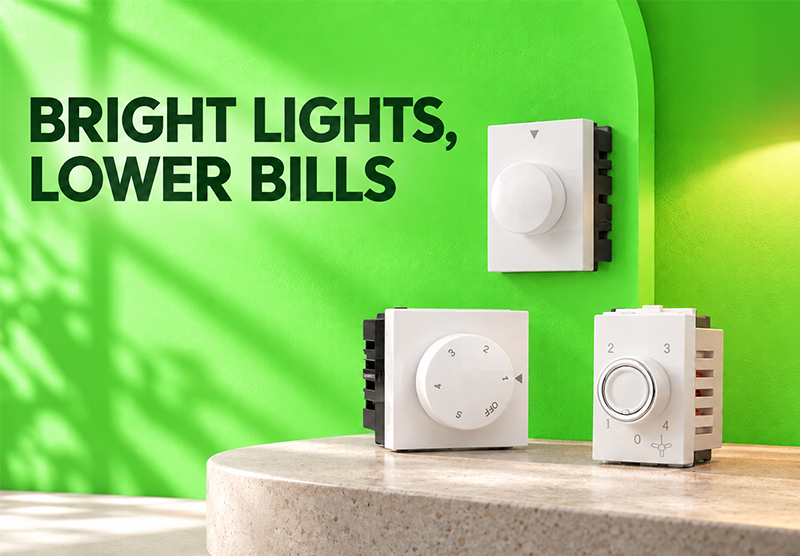
Planning them early, alongside switches, sockets, and the regulators and dimmers that manage energy use, keeps a project from expensive rework later. Explore Precision Electricals’ modular switch range to see the full accessory set, and read our companion article on how regulators and dimmers save energy for the rest of the switchboard specification picture.
FAQ
Modular switch accessories are individual functional modules, such as USB charging sockets, TV coaxial points, internet (RJ45) and telephone (RJ11) jacks, blank plates, and indicators, that fit into the same modular switchboard frame as standard switches and sockets. They let a project add charging, entertainment, and data connectivity without separate wiring boxes.
In many cases, yes, provided the switchboard uses a compatible modular system with an available module slot. A qualified electrician should confirm plate and frame compatibility, along with available load capacity, before adding a USB module to an existing installation.
A TV coaxial point connects a television to a cable or satellite feed line, while an RJ45 internet point connects networked devices to structured data cabling. They use different cable types and serve different infrastructure, a project typically needs both if it supports both TV and networked/internet connectivity in a room.
Yes. Unlike standard power points, TV and data points depend on dedicated cable runs back to a distribution point or patch panel. Deciding their location after first-fix wiring is complete usually means exposed cabling or reopening walls, so these should be finalised alongside the electrical layout.
A blank plate fills an unused module position on a switchboard, keeping the plate visually complete while reserving space for a future accessory, such as a USB socket or data jack, without needing to replace the entire plate later.
It’s generally not advisable. Mixing accessory modules across manufacturers or series can lead to finish mismatches and, in some cases, mounting incompatibility, since module sizing and frame design vary by manufacturer. Sourcing switches, sockets, and accessories from the same range keeps the installation consistent and simplifies future replacements.